Resources · Phase 1 · ICP and positioning
ICP plugin
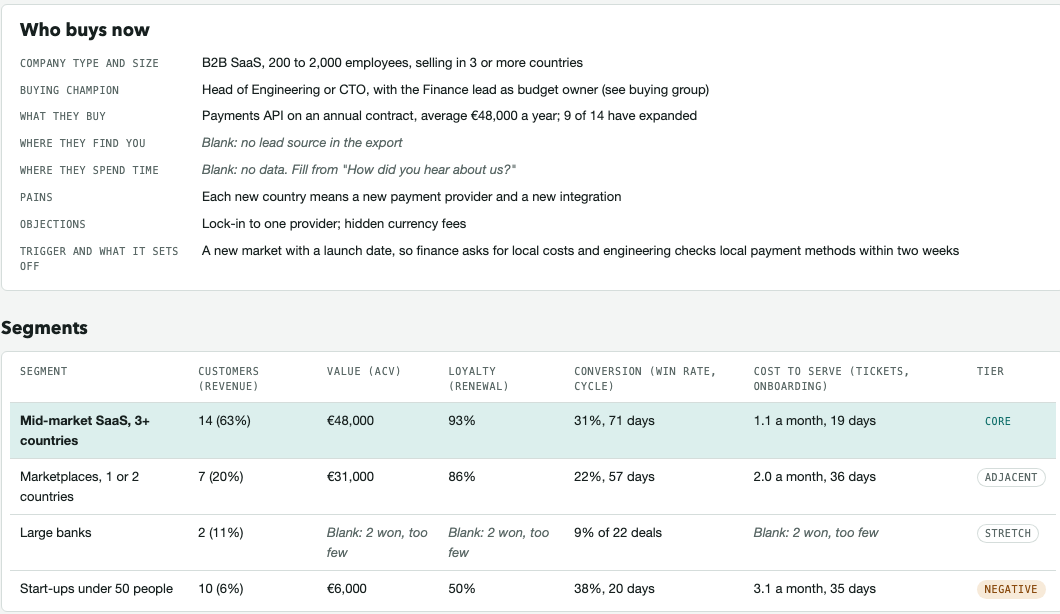
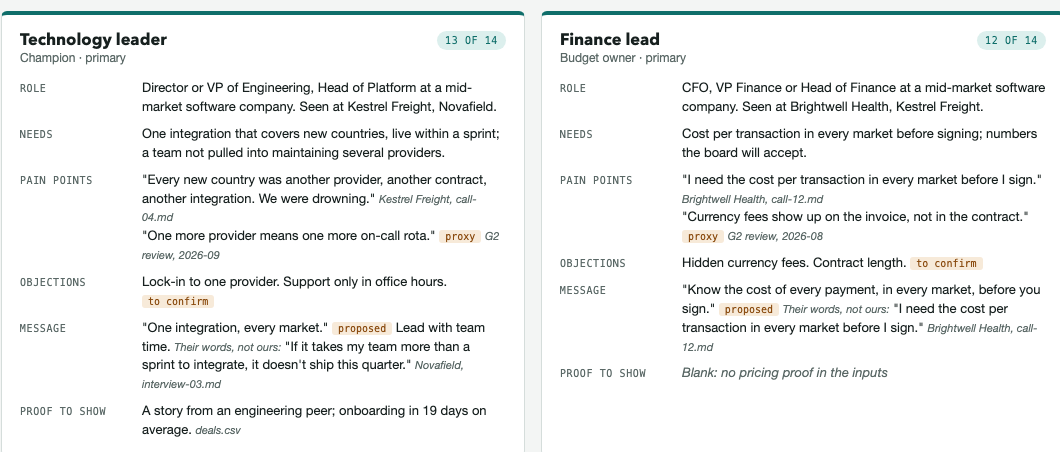
This plugin lets you build your ideal customer profile, your buying group and one persona per main role from your own CRM deals and customer words.
What you get
Two Markdown files you can edit, and a one-page dossier you can share. The example below is built on invented data: Aldermere Payments and its customers are not real companies.

How it works
Get the pluginFree and open source
https://github.com/federicoanedda/gtm-powered-by-ai
View the repository on GitHub ↗
Install it in Claude
- Open Claude and click Customize.
- Select Plugins, then Add (+) and Add marketplace.
- Choose Add from repository and paste the link above.
- Confirm with Add.
- Choose gtm-icp and install it.
Use it
- Set up. In a project folder, run
/gtm-icp:setup. It creates thegtm/workspace and never overwrites a file. - Add your data. Put a deals export and the contacts on those deals in
gtm/inputs/crm/, and customer words (calls, interviews, review quotes) ingtm/inputs/customer-voice/. - Answer a few questions.
/gtm-icp:dossierasks about your market and who owns the ICP, one question at a time. - Review the draft. Lines that are not proven carry a tag. You cut, correct or keep each one, and the file moves from draft to final.
Read the README for the full instructions.
What it will not do
It needs your dataIt works from a CRM export and customer words. Without them it can only ask you questions.
It will not guessMissing means blank. No invented customers, metrics or quotes.
It does not choose for youIt proposes the ICP and you decide. A segment with fewer than 5 won customers is not scored.
Built for B2BFor consumer businesses it builds the ICP only, not the buying group.